Notifications in Citizen app
Push notifications is sent when you have new information or tasks in Edlevo.
How it works
When a push notification is sent, you will get a push notification to your mobile device that you have used to login to Edlevo with.
Open an Edlevo notification from your mobile notification screen/lock screen
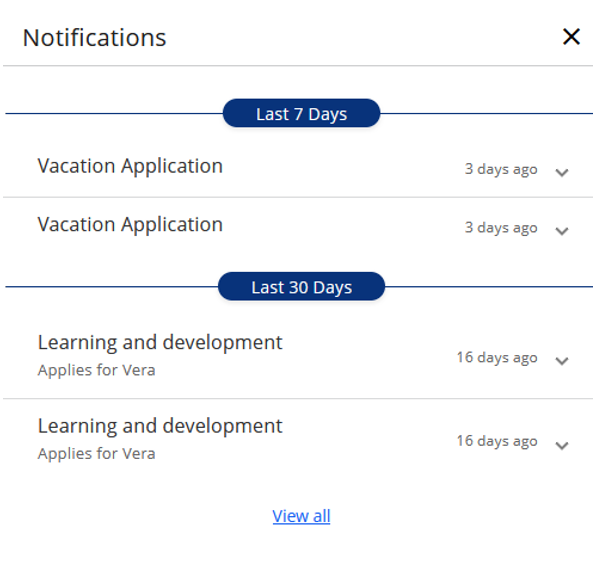
If you click on the notification, you will be redirected to the Edlevo service that sent the push notification. Details and notification history is always presented in the notification center. The notification will automatically be set as read when clicking on it.
Open an Edlevo notification from the notification center in Edlevo
If you don’t click on the notification and login to Edlevo, and then opens the notification center, you will have unread notifications, marked with bold title and a red dot. If you click on a notification, the notification will expand and show details and the notification will be marked as read.
In the Edlevo top bar you can also always see how many unread notifications you have (if any). Numbers is presented on a red circle on the bell icon.
How long is a notification visible?
A notification is visible for 30 days.
When a device is not getting notifications
If you are logging in from another person’s device, then remember to log out! There is two cases when a device is not receiving notifications:
- Device unregistered
If a push notification is sent and Edlevo receive a device unregistered response (for example, when the Edlevo app is uninstalled), the corresponding device is removed as receiver in Edlevo. - Device re-used by another user
If User A logs in on Device A, and later User B logs in on the same device, the entry for User A is removed, and the device ID is now linked to User B.
In this case, User A will no longer receive push notifications.
Modules sending push notifications in Edlevo
The following modules send push notifications in the module above: News, Messages, Absence, Vacation application, Documentation preschool.
Note that some services still sends a notification by using the Message module, and when opening those you will see details in the message module and not the module that actually sends the notification. We are working for that all notifications should use the notification module above. Planned release in Q1 2026.
How to disable push notifications under inconvenient hours
Normally a push notification is sent when an event happens. Can be a status change in a module or something is published. If you for any reason does not want push notifications during specific hours, you can configure that on your mobile device under Settings for Notifications or settings for Focus. Example Notification settings in iOS and Focus in iOS. Or Control notifications in Android.
If you don’t have the app
If you have an old version of the app or don’t have the app at all, you will receive the push notification as an e-mail instead. The e-mail is sent to the registered e-mail address that you can update under the service Contact information.